


Fish AI - AI Fishing App
4.7340.00 Reviews
App Specs
- Version
- 1.2.1
- Updated On
- License
- Free
- Downloads
- 100,000+
- Developer
- GymBros Inc.
- Categories
- Sports
- Platform
- Android
Screenshots
 Analysis by AppCompare
I think the best way to judge Fish AI - AI Fishing App is to treat it as a planning and learning companion, not as a replacement for local knowledge or time on the water. Its appeal is the mix of catch identification, forecasts, suggested spots, and fishing notes. That combination can make an outing feel more considered, especially if you’re still learning what conditions and catches to pay attention to.
When the connection matters most
The app’s most useful moments appear to depend on timely information: checking weather, looking at suggested fishing locations, and sharing activity with other anglers. I’d make those checks before leaving home or while I still have a reliable connection, rather than assuming every screen will be equally useful beside a remote lake. The practical question is not only whether you have signal, but whether you can get the information you need before you start moving.
That changes how I’d use it on a fishing day. I’d check the forecast and location suggestions during planning, then save any useful details in my own notes or remember the key points before heading out. Once I’m at the water, I’d focus on fishing and use the app when reception and conditions make it convenient. I wouldn’t make a long drive solely because an app suggests a spot; access, local rules, safety, and what you know about the area still matter more.
A phone-friendly companion, with a few trade-offs
Fishing is a setting where phone use can be awkward: hands may be wet, the screen can be hard to read in bright light, and you may not want to handle a device near the water. That makes the app’s camera-based catch identification better suited to a deliberate pause after landing a fish than to constant checking. I’d take a quick photo when it’s safe, identify the catch, and put the phone away again rather than treating every moment as an opportunity to interact with the screen.
There’s also a useful distinction between digital convenience and dependable identification. A recognition result can give you a starting point for learning, but I wouldn’t use an app alone to make decisions that require certainty, such as whether a fish is legal to keep or safe to handle. Compare the result with reliable local guidance, especially when species look similar. For new anglers, that cautious approach turns the feature into a learning aid instead of an unquestioned authority.
Who will get the most from it?
I can see this fitting someone who already fishes occasionally and wants to connect observations: what the weather was like, where they went, what they caught, and what bait they used. The journal can help turn a vague memory—“that spot was good last time”—into a more useful record. A beginner may also appreciate having forecasts, identification, and a tutorial in one place, though the app cannot replace learning safe handling, local regulations, or basic fishing technique from dependable sources.
By contrast, someone who wants only an offline map, a simple logbook, or a specialist weather tool may prefer a focused alternative. A paper notebook works without battery or reception; a dedicated mapping app may be better for navigation; and a local forecast can be easier to interpret if all you need is weather. Fish AI is most compelling when you’ll actually use several of its fishing-related tools together, rather than expecting one feature to do everything.
Worth Reading Before You Choose

Flipboard Shows What News Apps Must Do Beyond the Feed

Switching to Android Auto Means Rethinking Your Driving Routine

Google Calendar Makes a Crowded Week Easier to Manage

Ludo King Makes the Most of the Minutes Between Plans

Baby Panda World Brings Quick Play to Modern Phones, but Its Game Library Feels Busy

ESPN’s Live Game View Makes Following Close Games Easier
One realistic outing
Imagine planning a short weekend session after work. I’d open the forecast while connected, review the suggested areas, and choose a location that also makes sense for travel and access. After fishing, I could photograph a catch for identification and add the location, bait, and conditions to the journal. Later, those notes might help me compare outings and make a better choice next time. The value is in building a personal record over time, not in expecting the app to guarantee a bite on a particular day.
That workflow also offers a small but worthwhile tip: record details while they’re fresh, but keep entries concise. A note about changing weather or the bait that drew interest is more useful later than a long account written from memory. I’d also avoid recording sensitive or private locations casually in anything shared with a community. The social side can make fishing feel less solitary, but sharing should be a choice rather than an automatic part of keeping a journal.
Reeling in the Features
First off, let's dive into what makes Fish AI a standout in the vast ocean of fishing apps. The app leverages the power of artificial intelligence to enhance your fishing experience, whether you're a veteran angler or someone who's just getting their feet wet.
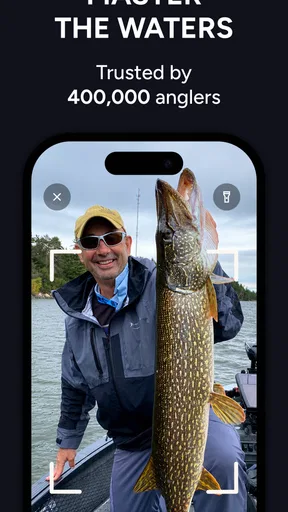
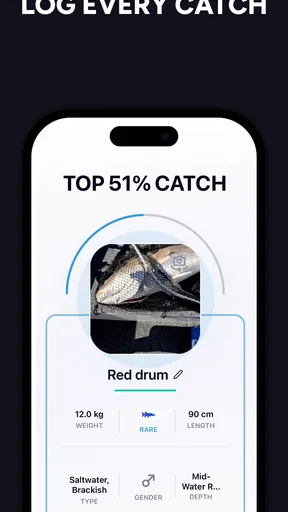
One of the coolest features is the real-time fish recognition. Snap a picture of your catch, and the app will identify the species in seconds. It's like having a marine biologist in your pocket! This feature is perfect for those curious souls who want to learn more about the fish they're reeling in.
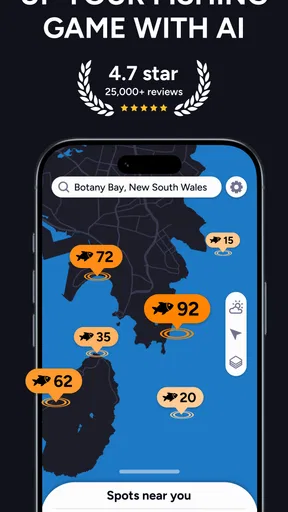
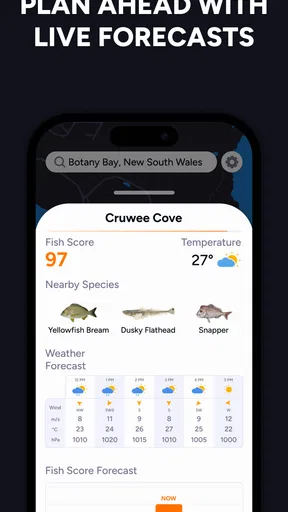
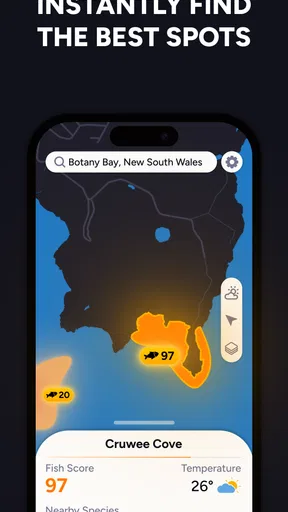
Another highlight is the weather integration. The app provides detailed weather forecasts and tips on when and where to fish based on conditions. It's like having a personal fishing guide available 24/7. The app's AI predicts the best fishing spots in your area, which can save you a ton of time and effort.
Interface and User Experience
Let's talk about the app's design. It's sleek, intuitive, and incredibly user-friendly. Even if you're not tech-savvy, navigating through the app is a breeze. The developers have clearly put a lot of thought into making the user experience as smooth as possible.
The app is equipped with a comprehensive tutorial for beginners. This step-by-step guide covers everything from setting up your profile to using advanced features. It's perfect for those who are new to both fishing and technology.
For a fishing app, ease matters more than decorative polish: I want to find the forecast or a journal entry without having to poke around while balancing a rod and tackle. I’d set up the profile and get familiar with the tutorial at home, not at the water’s edge. That is a small workflow choice, but it makes a difference when a phone is a tool you want to use briefly and then put away.
Community and Connectivity
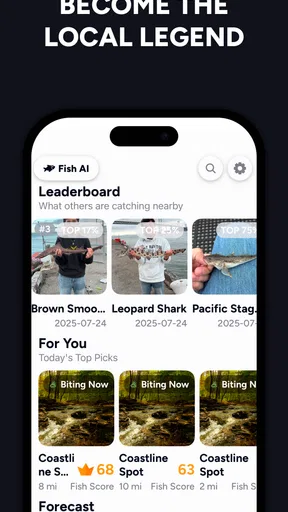
One of the aspects I truly enjoy about Fish AI is the community feature. You can connect with fellow anglers from around the world, share your catches, and even participate in friendly competitions. It's like social media for fishing enthusiasts.
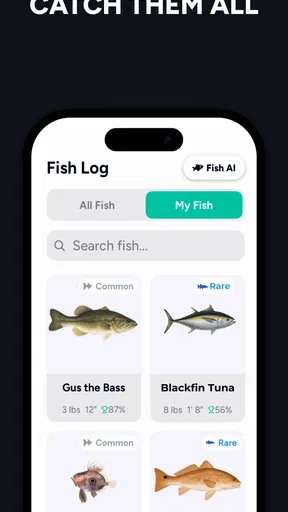
The app encourages you to document your fishing journey with a built-in journal. You can log your catches, note down locations, and even record the bait used. This feature not only helps you track your progress but also enables you to learn from past experiences.
Community activity and a personal journal serve different purposes. I’d use the journal for details I want to compare later, and the community for conversation or inspiration. If I’m fishing somewhere with weak reception, I’d avoid relying on a live social interaction to make the trip worthwhile. The outing itself should still work for me as an outing; posting a catch can wait until I’m back in a better-connected place.
Cost, expectations, and practical limits
Fish AI is a free sports app from GymBros Inc., with in-app purchases ranging from $9.99 to $79.99 per item. I’d start with the free experience and decide whether the tools I actually use justify spending more. Since the app combines several functions, it’s worth identifying your own priority first: if you mainly want forecasts, compare how useful its fishing-oriented guidance feels against a weather app you already trust before paying for anything.
The app has a 4.7 average from around 8,300 ratings, with more than 100,000 installs. Those figures suggest it has attracted a substantial audience, but they don’t tell me whether its recommendations will suit a particular lake, coast, or fishing style. I’d treat local conditions as the final authority and use the app’s suggestions as a way to narrow down what to consider, not as a promise of results.
It is rated for Everyone, and version 1.0.4 requires Android 8.0 or later. It was released on July 4, 2025, so it is a relatively new option; I’d keep expectations measured and check that the features I care about work well for my routine before making it part of every trip. That matters most if you depend on a particular workflow, such as keeping consistent catch records or planning around forecasts.
When plans change or the signal drops
A useful test is to imagine the app being less available than expected: reception fades, the battery is low, or rain makes it inconvenient to take out your phone. I’d avoid making the app the only place I keep essential trip details. Check directions and weather before departure, carry a separate way to navigate when needed, and keep safety or regulation information available from a dependable source. Those habits are sensible for any phone-based fishing companion, and they prevent a connectivity hiccup from dictating the whole outing.
If a forecast or suggested spot does not load when you want it, I’d switch to a trusted local forecast or my own knowledge rather than repeatedly refreshing at the water. The app’s strongest role is helping organize choices, not removing uncertainty from fishing. Treating recommendations as one input keeps a slow session from feeling like the app has failed simply because the fish did not cooperate.
How it fits among fishing tools
Compared with a standalone catch log, Fish AI brings more of the planning and discovery side into the same experience. Compared with a weather-only app, it has a more fishing-specific purpose, while a dedicated forecast tool may still be clearer for someone who only wants meteorological detail. And compared with asking a local angler, its suggestions can help you prepare, but they cannot reproduce that person’s firsthand knowledge of access, seasonal patterns, or unwritten local habits.
That balance is why I’d recommend it most to curious anglers who enjoy learning from their own trips and want more than a digital notebook. It is less suitable for someone who expects precise guarantees, needs robust navigation above all else, or dislikes using a connected phone outdoors. Before a first trip, I’d check the interface and tutorial at home, decide what information I want to record, and keep a simple backup plan for the basics.
Final Thoughts
So, is Fish AI worth the download? Absolutely! Whether you're a seasoned fisherman looking to up your game or a newbie eager to learn, this app has something for everyone. Its blend of AI technology and community interaction makes it a must-have for anyone passionate about fishing.
Plus, with the convenience of having everything you need in one app, it's like carrying a tackle box in your phone. So, grab your gear, download the app, and head out to your favorite spot. Who knows? Your next big catch might just be a tap away.
Ready to cast your line into the digital waters? Fish AI - AI Fishing App might just become your new favorite fishing companion. Happy fishing!
Pros
- Accurate fish species identification.
- Real-time weather updates enhance planning.
- User-friendly interface for all ages.
- Offline mode available for remote areas.
- Detailed fishing tips improve skills.
Cons
- Limited free features in basic version.
- Occasional GPS inaccuracies reported.
- Requires a stable internet for updates.
- Battery consumption is relatively high.
- In-app purchases can be costly.
FAQs for Fish AI - AI Fishing App
What features does Fish AI offer to enhance my fishing experience?
Fish AI provides a comprehensive suite of features designed to optimize your fishing adventures. With real-time weather updates, fish activity forecasts, and an advanced GPS system, the app helps you identify the best fishing spots. Additionally, it offers detailed fish species information and a logbook to track your catches and progress.
How accurate are the fish activity forecasts in Fish AI?
Fish AI uses a combination of algorithms and real-time environmental data to provide accurate fish activity forecasts. While no prediction can be 100% accurate due to natural variability, the app uses historical data and current conditions to give you reliable insights, significantly improving your chances of a successful fishing trip.
Is Fish AI suitable for beginner anglers?
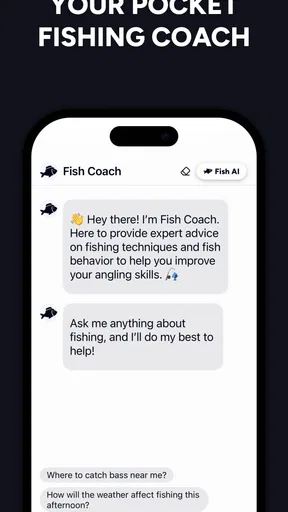
Yes, Fish AI is designed to cater to both beginner and experienced anglers. It offers user-friendly navigation and detailed guides on fishing techniques and fish species. Beginners will find the app’s tutorials and tips particularly helpful in learning the basics and improving their skills over time.
Can I use Fish AI without an internet connection?
While Fish AI offers offline functionality for some features, such as the logbook, certain aspects like real-time weather updates and GPS tracking require an internet connection. It’s recommended to download necessary data in advance if you plan to fish in areas with limited connectivity.
Are there any in-app purchases in Fish AI?
Fish AI is free to download, but it does offer in-app purchases to enhance your experience. These may include premium features such as advanced forecasting tools, expanded fish databases, and ad-free usage. Users can enjoy most basic features without purchasing, but premium options provide added convenience and functionality.


